

Fiduciaries · client portal
Available
Missing document: from the portal to resuming processing
Flag, upload, resume: no printing or rescanning.
The situation
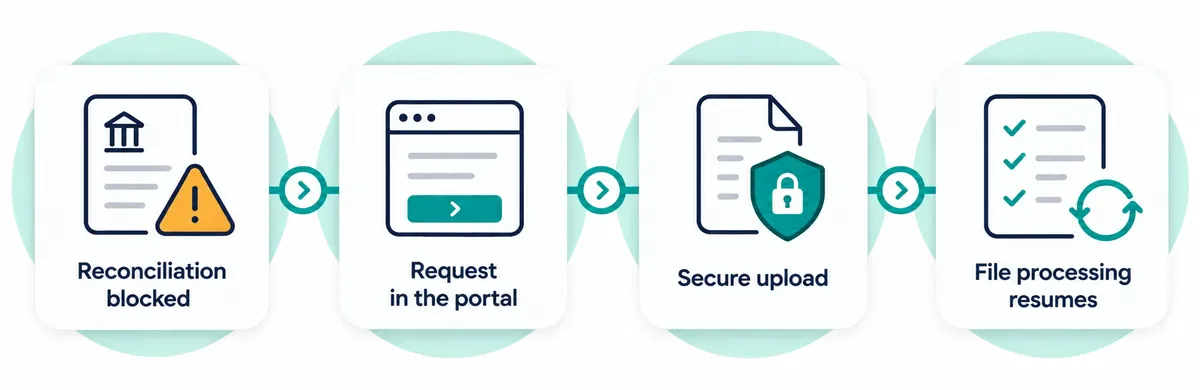
While reconciling a bank account, the fiduciary firm finds that a supporting document is missing. The usual route: an email, a late reply, a document printed then rescanned.
What Pinnokio does
- 1
Flag the document
The fiduciary firm indicates the missing document in the client portal.
- 2
Inform the client
The client sees the request, with the relevant context.
- 3
Upload securely
The client uploads the document securely.
- 4
Resume processing
The document returns to the file's processing flow.
The result
The file resumes where it stopped. A dedicated mailbox per client can also receive documents, processed according to context and the rules you have set.
Limits and approvals
- The portal carries the fiduciary firm's name and colour; the logo comes later.
- The portal assistant, which draws on the firm's knowledge, is a feature coming soon.
Frequently asked questions
How does the client access the portal?
The fiduciary firm invites its client, including one without a Pinnokio account: the client accesses only their own file.
Can documents be received by email?
Yes: a mailbox dedicated to the client can receive documents; an agent handles incoming mail according to context and rules.
Related path
FiduciariesSee how it works on your own scenario
A business situation, your tools, your rules: the demo starts from your reality.